Wednesday, March 14, 2012

Why WinRT in Windows 8 is based on COM instead of .NET – Part 4

And then came the iPad…

In parallel to all the improvements in .NET, someone else gained a lot of strength by disrupting the mobile and tablet market: Apple reinvented mobile computing and created an application and developer ecosystem that had a very interesting business case for many developers.
And they made this by using an “old” (in my opinion quite unattractive) programming language (Objective C) and “native code”. iOS apps are primarily “fast and fluid” – one of the core attributes Microsoft now pushes heavily for its own Metro-style apps. “Fast and fluid” is one of the great and mostly unmentioned selling points for many Apple products: A nice design is one thing, but you need a very good (UI) performance to make the products “feel right”.
This is especially true regarding loading times of applications and response times for touch interactions. These aspects made and make Apple products feel somewhat different and premium. 
I think, Microsoft understood this development quite early and considered options to react in a proper fashion. User Experience (UX) became even more important than ever before. Something had to happen with the Windows Operating System, its old-fashioned APIs and missing touch capabilities. On the other hand, the developer ecosystem needed to be pushed into the new world, because Microsoft knew: many of those existing applications need to get a new user interface if they should run on a touch-centric device.
Problem 1: time to market.
Problem 2: .NET loading and UI performance
The solution: Going native
All these factors led to to the resurrection of COM as base runtime technology. .NET/COM interop was a well-known - yet tricky - topic. But .NET and C# had wisely been enhanced with “dynamic” language features to somewhat reduce the interop pain.
It was too tempting for Microsoft: COM was selected to get a comeback as base technology and even as native UI technology to make a “fast and fluid” Windows UI a reality. The .NET runtime has lost this important competition. It will be used as application technology in between the WinRT OS API and the WinRT controls. Not more and not less.
What does this mean for .NET developers, who want to create Metro-style apps?
  • Developers will have to learn how to write portable .NET class libraries if they want to use C# to formulate client-side business-logic, view models or validation code. In our experience this will still be 40%-60% of professional applications.
  • Developers will use two different type models (.NET types vs. WinRT types) and need to convert between them – even if the WinRT APIs take away a lot of pain.
  • Developers will have to get accustomed to different lifecycle models for different objects: .NET objects will be garbage collected, WinRT objects will be subject of the “reference counting pattern” – even if it will be hidden somewhere behind SmartPointers and the like – there will come a time when it is important to understand the difference. The combination of both models will get tricky in certain scenarios.
  • And finally: some developers will have to return to C++ in order to extend the WinRT with components. The option to do this with sealed C# classes doesn’t look very promising.

Wrap up

So to wrap up: this is a natural development. The .NET team didn’t manage to become a core Windows technology over the past 10 years. The people responsible for the operating system still trust in “legacy” technology, and regarding the options at hand this seems to be a valid decision.
But: The problems of this decision might show up in near future. The “projection” of the COM type system into .NET and Javascript worlds are some kind of magic and technologically very interesting. Yet again: they blur boundaries and differences of quite different worlds - instead of making them explicit. Windows 8 developers will have to live in this “split world” and will have to learn about at least two different technologies when they hunt down tricky bugs…

Why WinRT in Windows 8 is based on COM instead of .NET – Part 3

Hope for WPF

I talked a lot about the potential of .NET in part 2 of this blog series. The DevDiv at Microsoft finally tried to use that potential. They decided to reengineer Visual Studio – using WPF as UI technology in Visual Studio 2010. Dogfooding .NET UI technology – finally. This decision should have a great impact on WPF and .NET runtime performance.
Microsoft saw first-hand that WPF performance in .NET 3.5 wasn’t sufficient for a real-world product like Visual Studio. I think the .NET runtime never saw a bigger performance improvement than with the release of .NET 3.5 SP1. These improvements were vital to ship a good Visual Studio 2010 and helped a lot of .NET projects out there.
All looked good. At the time I thought WPF might make it into Windows core – as Microsoft had promised at PDC 2003 when WPF was introduced as Avalon and MS showed pictures that .NET would step by step become core technology to replace the WIN32 API. But things went differently…

Why WinRT in Windows 8 is based on COM instead of .NET – part 2

The rise of .NET

.NET was created to solve many of the type mapping problems of COM that I described in Part 1. Microsoft really wanted to improve the developer productivity – and thus decided to invent a new programming language – the birth of C#. What a beauty for a seasoned C++ developer. It was consistent, a well designed blend between C++ and Java. We developers had to write considerably less code than in C++. Less code means less errors. The migration from C++ to C# just felt right.
We C# developers got to love a better exception handling, huge libraries with lots of functionality and more consistent coding guidelines than ever before. .NET V1 missed a template mechanism with type-safe, generic collections. But the language designers were so bright, that the introduction of generics in v2 was no big pain. .Net and C# rose in popularity – and that had one major reason: .NET and C# could be used everywhere: You could use it for plain algorithms, UI, Server side code, web pages, web services and even the higher layers of embedded systems. And even more important: Microsoft constantly reshaped its own, freshly acquired Server-side products (like Biztalk or Sharepoint) to build an ecosystem around .NET. That increased the trust of many customers into the growing ecosystem. Especially in Germany it was quite a hard fight to establish C# and .NET as relevant and proven technologies into the Architecture Blueprints of bigger companies and use them as a foundation for mission critical systems. But .NET became more and more attractive for enterprises because of its reach, breadth and continuity.
Many developers joined in, the component market was booming – yet there was one problem: Microsoft itself never used .NET in its major client products: No .NET in Windows, no .Net in the core Office products. The teams of those very important Microsoft cash cows never joined in. That meant Microsoft never “dogfooded” WinForms or WPF for its own big developer teams in Redmond. Something was wrong regarding internal adoption, but not many noticed…
In 2003 I had joined my current employer Zühlke and changed from the software product development to the project development and consulting side. I saw many different project scenarios in a short time and got to learn all the different areas of the .NET framework. I was kind of an evangelist for .NET technologies in many different projects, helping our costumers to adopt these brilliant technologies. It was in 2005 when I faced the first serious problems with .NET loading performance. One of our ISV customers had built a big WinForms solution with our help and had problems with startup performance. The end customer was a well known German car producer and didn’t accept application “boot times” of over 40 seconds. This only happened when the computer was freshly booted – but at the time nobody suspended their machines into standby. Every user freshly booted in the morning, so we had a real problem. We analyzed the problem. Result: It took 38 seconds to hit a breakpoint at the beginning of main()! 2 seconds left for us to optimize. It wasn’t our problem. It was a .NET problem. We had many DLLs and the .NET runtime was simply extremely slow in loading and precompiling - whatever. Nobody in Redmond could help us on these problems. Microsoft hadn’t noticed these fundamental problems, because they mostly built Hello world examples with their frontend technologies. By that time I had an idea, why the Windows and Office teams didn’t want to join the .NET train… Nevertheless, we built great apps based on .NET, but the UI story had limitations for bigger applications with many screens.
More on this in part 3 and 4….

Why WinRT in Windows 8 is based on COM instead of .NET

I was very surprised when I first heard at //build/ conference that the heart of Windows 8 and its Windows Runtime (WinRT) wasn’t based on the .NET Runtime but… on COM – the good old Component Object Model. Microsoft had “parked” this technology for more than 10 years and pushed other technologies. Now this old beloved dinosaur is back. And then again – this is no surprise at all if you think about it. This step has many reasons and root-causes. I’ll try to show you some of them in this little blog post series…

Disclaimer: I don’t work for Microsoft and have no deeper insights, but that might help to get an objective opinion why things came the way they came.

To show that I need to go back to the beginning of my professional career as a software developer, when I learned the advantages and disadvantages of C++ and COM:

Part 1: In the beginning there was COM…

I started to program in the late 80s. My first system was an Amiga and my first programming language was Basic. Later on I tried out several other languages during my studies of computer science. I used Pascal, C and Foxpro for several jobs, before I got a friend of C++ and its OO and templating capabilities. I started to work with Borland OWL in 1993 before I became part of the Microsoft developer ecosystem in 1996 (Visual Studio 6, C++, MFC).

At the time I was part of a great team that was or at least felt “ahead of time”: we attended every TechEd in Europe and became big friends of component oriented software design with COM and ATL (ActiveX Template Library). Add STL (Standard Template Library) for some great containers. These technologies were our basis to create quite a big editing system which our small software company sold successfully to some major German newspapers.

We were big fans of COM-hero Don Box. Don still worked for DevelopMentor and held excellent talks about COM. I remember an inspiring COM talk of him while he was sitting in a bath tub on stage – legendary.

My team knew every single line of source code of the ATL libraries. Our system had well over one million lines of C++ code, divided into more than 50 COM components. The complete system was able to start up in about 3-4 seconds – fully functional, with a decoupled and cohesive design. We used nice features like “Edit & Continue” in our Visual Studio tool chain – we changed source files during a debugging session and the changes were applied while the system was running (try this in VS 2010 with a big C# solution…). Features like that were important for productivity. No, we didn’t use TDD at the time – that wasn’t yet “en vogue” in the late 90ies. Developer’s life was different – more experimental than nowadays.

Yet we had some pains with COM: you constantly had to convert between different string types like CString, BSTR, _bstr_t and char-Arrays. There even was a wild mixture of Unicode and ANSI strings with language dependent code-pages. COM features like VARIANTs and HRESULTs helped to bridge between C++ and VB, but caused a constant clash between the COM and C++ type systems. Yes – some of those dangers might come back at you with Metro-style apps – but I’m positive Microsoft will try to reduce that pain. But: you are still crossing language and runtime boundaries and you know: boundaries should be explicit…which they aren’t if too much “type projection” happens under the hood.

But back to the 90ies: COM uses reference counting instead of garbage collection. That means COM objects die exactly in the moment, when the last reference on it gets released. And: They never die if someone forgets to release its reference. But this was no problem in our projects, because we had defined strict rules, when to use smart or raw pointers. We just knew very well when to AddRef and Release interface pointers to keep resource handling clean. Boundaries were explicit – thanks to COM IDL (Interface Definition Language). But it was a lot of code to write.

Then there came .NET and many things became much, much simpler – and some got worse – but it took us some time to become aware of that point.

One thing in .NET was strange to me as an old COM veteran in the first minute: why do we need a garbage collector instead of strong and weak references and the good-working ref-counting? And why isn’t there a reliable built-in concept to manage resource types like file handles, windows handles and the like? Everything else was fine for me, but I didn’t like this new-up and forget concept. Yes, Microsoft introduced IDisposable, but that was half-hearted – a high-level framework concept for a missing feature in the .NET runtime. We as developers couldn’t enforce correct resource management anymore, if resources were shared. We also couldn’t enforce memory management if we needed it in restricted environments such as embedded systems. That was a lack of control and may be a tick too much abstraction.

I wrote emails to my heroes (Don Box and others) at the time, because I saw the limitations to build systems with low memory footprint or exact resource management, but nobody wanted to see the problems.

Sunday, March 11, 2012

How to put a great developer ecosystem at stake: Microsoft .NET

I’m deeply involved with the Microsoft developer ecosystem for many years. I followed many twists that Microsoft performed with its technology stack during that time and defended most of them in discussions within my team and with customers.

But I think Microsoft is about to put large parts of what it built up at stake and might lose the confidence of many developers (and decision makers) – that’s why I felt it necessary to describe my point of view of the current situation (March 2012)...

My main concerns are:

1) It is a big mistake to keep the community uncertain about the future of Silverlight and WPF – these are technologies that are used in many mission critical enterprise apps, they’ve got great support by 3rd party libraries. Many CIOs and CTOs of smaller and bigger companies have bet on these technologies, ISVs have incorporated them into their products. These investments should be respected by Microsoft – and by that I don’t mean to declare 10 years support for Silverlight 5. These technologies have deserved some more attention than “support”. The developer community is very sensitive about when technologies are declared as “legacy” by its creator...

2) It is another big mistake to underestimate the importance of embedded software. One of the big strengths and USPs of .NET and C# has been the fact, that you can use it from sensor to the cloud, on phones, desktops, servers and for web applications… you name it. But Microsoft doesn’t seem to understand the importance of embedded software. The future of Windows CE and .NET Compact Framework have been uncertain for several years now. Embedded developers don’t get the deserved support in the current Visual Studio version, they always lag behind at least one version. Microsoft tries to scale down the Windows 8 kernel for its phone OS, but doesn’t seem to put much effort into the development of Windows CE, .NET Compact Framework or .NET Micro Framework. The number of embedded target devices will be at least one magnitude higher than the numbers of tablets and smart phones combined in near future. These devices will play a fundamental role in the connected solutions we all will build throughout the next years. These are the Azure clients of the future. Nobody at Microsoft seems to understand…

3) Windows 8 makes .NET developers “2nd class citizens” regarding metro-style apps. At least it feels like this until now (March 2012). The focus lies extremely on HTML and Javascript (which is a great move to bring web developers to the platform – don’t get me wrong). The XAML/C# story looks different. I sent some of my colleagues to Build Conference and watched most of the videos, I talked to a lot of people from Microsoft and partners and I finally did a research with my team on what will be possible for .NET developers after the Win8 consumer preview was released. It’s very disappointing. A lot of information on “Hello world scenarios”, but no convincing architecture descriptions or profound documentation. Sample apps done by students. WinRT – a platform for students and hobbyists? Great! Microsoft: Think about your enterprise customers who finally want to use tablet computers with Windows!
Fact: We all will have to invest heavily, if we want to port existing, relevant(!) .NET applications to WinRT. I don’t speak about the effort to create a new UI for metro (that’s crystal clear to everyone), I talk about your client-side business layer, validation logic and service agents: No matter if you want to port a Silverlight, WPF or Windows Phone application with a little more logic than “the weather app” to WinRT, you will have a lot to do. Most of the 3rd party .NET libraries we all love have to be rewritten in big parts, because they now have to become “portable .NET class libraries”, otherwise you won’t be able to use them in Metro-style apps. The MSDN page how to do this has just been published. Let’s keep fingers crossed that many 3rd parties are motivated to use this concept (important ones like the creators of RestSharp are not).
The availability of many great apps is critical to make Windows 8 successful. Microsoft is very late in preparing the development tools and their documentation to support the developer ecosystem. More complex Windows Phone apps (like this one) take at least 6 months of development time – I don’t expect this number to shrink for Windows 8. It will get hard for Microsoft to launch Windows 8 with many great apps. At the moment .NET programmers might have less trouble to port an existing .NET application to the iPad by using MonoTouch than to target Windows 8 & WinRT.

Summary

I think, all of these topics deserve some kind of management attention at Microsoft. They don’t have that much to do with technology, but more with PR towards the community to create more buy-in and understanding.

Microsoft has learned to deal with the community in the Web space, thanks to great people like Scott Guthrie, Scott Hanselman and Glenn Block. They do a great work and create convincing transparency about where they will drive their technologies. Similarly Jeff Wilcox showed how to drive and support the Windows Phone developer community. Now is the time to improve the communication in those other areas which are equally important to many people out there.

Tuesday, December 09, 2008

PDC2008 - Day 4

My forth day at PDC was dominated by two very interesting sessions regarding RESTful web service design and creating textual domain specific languages with the new "M Grammar" which is part of the "Oslo" project.

RESTful Web Services

REST is a very interesting architectural style to create Web Services based on simple standards like plain HTTP, heavy use of URIs and simple data formats like XML, JSON or ATOM. RESTful services deliberately avoid the more complex WSDL/SOAP world and trust in the power of HTTP. This PDC showed, that Microsoft itself makes heavy use of the REST idea in several areas.

Azure and Live services use REST in combination with the ATOM Pub format in order to hyperlink entities in a uniform and simple way - thus leveraging possibilities for dynamic service clients.

The PDC session "WCF: Developing RESTful Services" by Steve Maine and his colleague Ron was one of the highlights at this PDC, because both speakers made a great job to outline the basic REST ideas and motivate the use of  this approach in combination with WCF. WCF itself supports REST with its WebHttpBinding since version 3.0. But the WCF team has just released an add-on package during PDC in order to further simplify the creation of solid RESTful services with WCF. The speakers showed some great demos on how to

  • use attributes in order to route HTTP verbs to the correct method
  • use newly created exception types to report correct HTTP status codes in a very .NET-friendly way
  • create services that easily expose and clients that consume your data via JSON (for AJAX clients) or ATOM pub for smart clients
  • how to use tools like Fiddler to inspect REST conversations
  • how WCF offers metadata for RESTful services via ATOM Pub

You should be able to find the add-on package in the meantime via http://msdn.microsoft.com/wcf/rest. I would also strongly recommend to watch the video of this great session, if you are interested in this topic.

"Oslo": Building textual DSLs

Chris Anderson and Giovanni Della-Libera gave a demo-focussed talk about "M Grammar" and its use to create your own textual DSL. They showed, what it takes to create a flexible textual DSL for telephone contacts like the following line:

contact: John Doe 2334-2345-222

The demo showed how to build up tokens, syntax trees, white-space handling, recursions etc. Chris and Giovanni revealed the real power of the "M Grammar" with several samples and created their contact language in an incremental fashion. Currently the usage of the DSL still seems in a very early stage - features like LINQ and dynamic types will need to be implemented before a final release.

The audience was very interested - many language gurus had deep questions regarding details of the new language and gave Microsoft lots of interesting ideas for the next months and years.

I'm very curios, where this journey will lead the development on the .NET platform - in my opinion it might have a big impact in how we develop in the future.

Summary

In my opinion "Oslo" was _the_ technical innovation at this PDC. I think the language and its tools will undergo heavy refactorings during the next 12 months - but it will be a big leap into the right direction.

Windows Azure and its services will help fast growing companies to host their environment and to avoid heavy investments in on-premise hardware. Azure and its Internet Service Bus are also a great opportunity to build supply-chain solutions or connect enterprises in a very elegant fashion - without  sacrificing security investments - Azure just federates between the custom already-established security systems. Azure also allows event-driven and pub-sub architectures between enterprises behind firewalls - which was hard to establish before without opening security holes.

Windows 7 is again a new Windows OS - and doesn't seem to be a BIG release from the perspective of a software engineer. But it will improve certain common problems like working in different networks etc. It will find its customers and make fewer problems than Vista, because the Vista device driver model isn't changed and Microsoft seems to have learnt some of the Vista lessons...

VSTS 2010 and .NET 4.0 will be very big releases. Microsoft pushes heavily in many different areas. WF is strongly improved and is used in many other products. The C# compiler will be heavily improved in v4. WPF and Silverlight merge stronger together and learn from each other. XAML is further improved and designed to be a solid basis for vast parts of the platform.

Last but not least: Microsoft apparently watches developments in the community and reacts quite fast (regarding the size of the company) to new trends like dynamic languages, REST and cloud or parallel computing - without sacrificing investments of the past. This makes the .NET platform a solid basis for application and service development, which will reach even higher maturity with v4.

Thursday, October 30, 2008

PDC2008 - Day 3

Microsoft Research Keynote

Day 3 of PDC was opened by Rick Rashid - lead of 800 researchers at Microsoft Research. Rick gave some interesting insight into his life and the current work of one of the largest research organizations of the world. Especially demos about world-wide telescope and SecondLight - a new version of the multi-touch Surface computer - were fascinating. But they were all topped by Matt MacLaurin and his Boku project - a graphical programming environment for children. It is designed to enable kids to program impressive little games using a game controller. Details and screen-shots can be found here.

Internet Service Bus

My next session was Clemens Vasters talking about Azure Services as an Internet Service Bus. Clemens did a great job in motivating the new cloud services and their technical details.

Central point is a service registry, which can be found at http://servicebus.windows.net/services/.

Services hosted on a local server can be registered in the web under this new domain. Service clients can address their calls to the servicebus directory, but are instantly re-routed to your local service implementation. This happens in a very intelligent fashion and depending on the binding you select. Clemens has some excellent graphics in his slide-deck illustrating the process in detail.

Azure services use the well-known WCF programming model, but are heavily based on web standards - thus enabling interop with Java, which Clemens promised to show in a session tomorrow...

The biggest advantage of the Azure service platform is the possibility to use it as a relay which establishes a direct, bidirectional connection between a client and a service despite firewalls and NAT. This is done via socket forwarding and port probing. Client and server only need to create outbound connections into the cloud in order to start communication. The rest of the job is done by the Azure fabric, which snaps the sockets to match each other and gets out of the way of the normal service communication. This all can and shall be done with message level security. Authentication and authorization features are also provided, their use is strongly recommended.

These features finally enable secure pub-sub solutions between enterprises. Clemens called it "pervasive, secure connectivity for services" and a "DMZ in the sky"...

I recommend watching the video of this excellent presentation as soon as it is available online!

VSTS 2010 Architect Edition

My next topic was an interesting discussion with Peter Provost, Jeff Brown, Christian Binder and my colleague and VSTS-specialist Klaus Liebe regarding the future of VSTS modeling, model merging and other very interesting stuff regarding VSTS project handling in general. It was great fun having direct influence onto an important area of the tool. Peter's presentation later on showed the vast interest of many developers regarding the new modeling features in VSTS 2010 architect edition. Now we got the newest CTP bits and can have a closer look into the newly created functionality.

Offline-enabled Data Services

Another very interesting session today was by Pablo Castro who introduced his project "Astoria offline". The presentation showed some very interesting problems if you want to create an Outlook-like occasionally connected system. The project team wants to create a solution to make services available offline by using technologies like ADO.NET data services (again REST...), Microsoft Sync Framework and the ADO.NET Entity Framework. Nice point is, that the solution is created with certain building blocks and you can replace the different technologies with technologies of your choice as long as you meet certain criteria.

Work on this project is still in a very early stage, but the guys definitely take the right direction to tackle these heavy problems of modern application design.

PDC2008 - Day 2

Keynotes 2 & 3

The second PDC day was again introduced by Ray Ozzie. The main topic of the keynote was to create holistic solutions for PC, Web and phones in order to create synergies and get the best out of the different devices. Ozzie and his colleagues introduced important new technologies as important blocks for this interesting vision on the Microsoft platform.

Demos of Windows 7, Azure Services, Live Mesh and the Web version of Office 14 showed interesting scenarios, how this idea might look like in the future.

Steve Sinofsky presented some fancy new features of Windows 7, most of them regarding the skinning, like a new task bar. But Windows 7 offers some really nice convenience features, we all would have needed since Windows XP:

A feature called "homegroup" distinguishes office and home environments for laptop users. This enables features like automatic swapping of a default printer - depending of the network you are currently working in. But "homegroup" offers more: One nice feature is a mechanisms to synchronize media and documents between all the different connected home devices. Thus it is possible to play music stored on other computers in the "homegroup".

A feature called "libraries" enables the user to create sort of  logical folders, which can be used to represent content from different physical folders at a common location in the explorer. One use case is to create a music library in order to scroll through music which is physically distributed in My music, an USB drive folder and a network folder, but presented in a common "library".

Next was Scott Guthrie showing off some different new technology stuff. Most interesting to me was that VS 2010 will be built with a completely new WPF-based GUI built on the Managed Extensibility Framework. This enables powerful extensions, especially for the code editor. ScottGu showed a small demo, in which he dynamically replaced the code documentation above the C# methods within the new code editor. Instead of the plain old
/// comments
he showed a nice embedded WPF control, which contained the comment text with hyperlinks into work items, that were referenced in the documentation text.

Another demo of Live Services and Live Mesh showed that Microsoft put also a lot of effort in these services in order to share data between devices, again through synchronization features.

BBC gave an impressive show-case demo of their  iPlayer v2, which is based on Silverlight technology and enables media consumption "on demand" and sharing of playlists and favorites between you and your friends in a very comfortable way.

Office 14 finally contains a Web edition. Demos for Office OneNote, Word and Excel showed that different users can work simultaneously on the same documents- regardless wether the use the desktop or web version of Office. Changed parts of the document are highlighted in the other user's application with the name of the other user. Changes are synchronized in an asynchronous fashion.

The third keynote of this PDC was given by Chris Anderson and Don Box. The session was extremely code-centric and showed the RESTful API experience if you want to address the new Windows Azure Services. Don and Chris generally are great presenters, but this time lost their audience several times, because they didn't motivate their quite entertaining show...

A modeling framework called "Oslo"

The remainder of my day was focused with the new modeling framework "Oslo". Oslo wasn't really mentioned in any of the keynotes, but might be one of the "big things" in the next years.

This new framework can be used to design textual and graphical Domain Specific Languages. New tools code-named "IntelliPad" and "Quadrant" help developers to design their own language and its graphical representation. The languages and their schema are defined using a new structural language called "M" which looks similar to JSON. "M" is compiled into a relational representation using the M compiler. The result is stored in a database in order to enable powerful queries against the models.

Oslo is still in a pre-alpha version - yet Microsoft starts to use it heavily in order to create its own DSLs for certain key areas. Prominent examples are MService to create a very short definition of service endpoints and MEntity - a very compact form of expressing object-relational mappings for the Microsoft Entity Framework.

Tuesday, October 28, 2008

PDC2008 - Day 1

Keynote

The first PDC conference day was opened with a key note by Ray Ozzie et. al. revealing Windows Azure - the new MS cloud  OS.
Windows Azure will serve as a third tier complementing the first (desktop & mobile clients) and second (enterprise servers) tiers. The presentation finally clarified Microsoft's Software+Service strategy - .NET developers will be enabled to enrich their applications with cloud services - either written by themselves and hosted on Microsoft's data centers or using Microsoft's Azure Service offerings. Identity federation might be one of the most interesting services leveraging enterprises' local Active Directory infrastructure as part of a claim-based, globally federated identity management system used "in the cloud". All in all the key-note was very focused on infrastructure aspects - thus it wasn't as thrilling to most attendees as other PDC keynotes in the past. Nevertheless it shows the big shift in Microsoft's business from product to service offerings - as I already expected in my post yesterday.

VSTS 2010

Cameron Skinner gave several nice demos regarding some key scenarios, VSTS 2010 is built to solve. We heard about these "Rosario" features now for some time, but it was quite interesting to see them running live. Main focus of VSTS 2010 lies in testing and architecture capabilities. One of the coolest features is to reproduce a bug found during a tester session on the developer machine. The developer is supported by the bug work item containing several attachments - containing screen shots and a video showing what the tester was doing and experiencing during the test session. The developer can jump into the video at every test step. Historical debugging information with call stack and context information is supplied - the developer can see visually and code-wise what was happening during the test session. This feature obviously still needs some some tuning - but one could see clearly the path that is chosen.

I think architects will love VSTS 2010. It supports UML 2.1 diagrams and makes heavy use of modeling in several places. There are code-centric features like generating sequence diagrams from code  - a great basis for re-engineering tasks. VSTS also supports model-centric design - e,g. by providing layer diagrams which can formulate your intended dependency graph between your different software layers - these can now be enforced via  build strategies. As soon as a developer violates your architecture rules by using a reference to an assembly residing in a forbidden layer you can let the build break. Great feature for pro-active quality management.

C# 4.0

Anders Hejlsberg was once again my personal highlight of the PDC day. He's one of the few speakers being very profound in his message and equally smart in his presentation technique and motivation for his topics. Anders spoke about multi-paradigm requirements for programming languages and how C# 4.0 will cope with modern aspects like dynamic typing, declarative programming and concurrent computing. Especially the demos regarding the new dynamic keyword in C# 4.0 impressed the audience. This simplifies interoperability with dynamic languages like Ruby or Python, but also tremendously improves COM inter-op scenarios. I strongly recommend watching the recorded video of this PDC session!

ASP.NET MVC

My next session was about ASP.NET MVC. I didn't learn anything tremendously new, but all my feelings about these bits were supported - this is cool stuff, which has to be watched closely. It is built by a small team in an incremental fashion and heavy community support and reviewing. ASP.NET MVC will be released end of year 2008 as an ASP.NET add-on. All the interesting aspects of Rails are ported to the .NET world leveraging the REST-approach, DRY and Convention over configuration. ASP.NET MVC is going into the right direction - the only problem is: forget about your well-known ASP.NET controls - this is a different world. Instead Microsoft trusts heavily in jQuery - an open-source  JavaScript library which now seems to become very important and can be used to implement some of the Web 2.0 glitter...

WF 4.0

This was my last session for today. It started quite high-level, but revealed some important news: My bad feelings about the current and - in my opinion - overloaded and complex WF design aspects in .NET 3.0 and 3.5 were supported. The team has decided to completely re-write the WF runtime for v4! It is now built on "Oslo" and the new modeling language "M", which will be revealed in greater detail in the keynote tomorrow morning.

Even the workflow designers now look completely different - they are built with WPF  technology. Workflows can now be expressed either graphically or textually be a specific DSL. Custom Activity design is claimed to be extremely simplified in comparison with the previous WF versions. Performance of the runtime is said to be increased by a factor of 10 to 100 - depending on the workflow scenario. Let's see how these promises behave in development reality...

Monday, October 27, 2008

PDC 2008 opened: "Think way outside the box!"

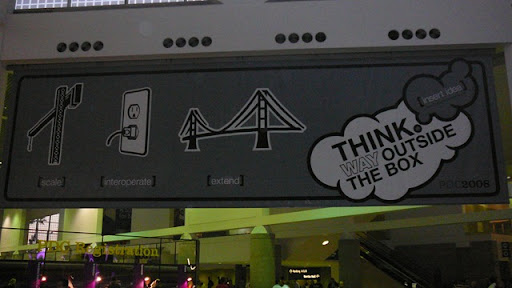
PDC 2008 was opened today with its pre-conference. The agenda looks pretty "cloudy" and even the posters show clouds - see below.

P1010692

What a shift for a company like Microsoft - the cloud and verbs like [scale], [interoperate] and [extend] might be more important than the announcement of Windows 7?!

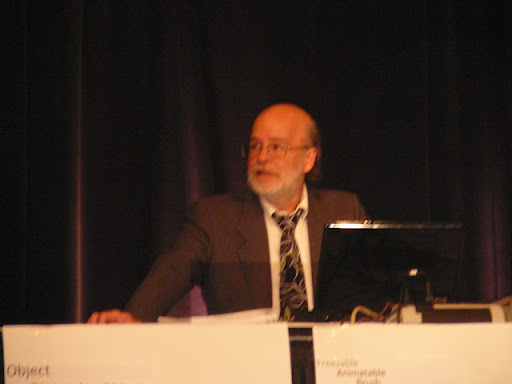
I was attending the WPF pre-conference session held by Windows GUI guru Charles Petzold.

P1010690

Petzold gave the audience detailed and completely powerpoint-free demonstrations about his experiences with the WPF object model, best practices in control and template design, talked a lot about dependency properties and showed the enormous power of XAML scripting. It was quite fun watching him showing the basic concepts using his XAML Cruncher - even if he didn't mention any groundbreaking new stuff for WPF experts...

Thursday, July 31, 2008

REST versus WS* - a wonderful parable!

Have a look at this wonderful parable. There is much truth in it...

Thursday, June 26, 2008

Software Factories in practice...

My (German) talk at the "Microsoft Launch 2008" about my experiences with software factories during the last years has been published as a video by Microsoft. You will find it here.

Finally arRESTed...

It took me some time to understand the real benefits of RESTful architectures, but a combination of good books about Rails and RESTful WebServices, current project issues and this podcast filled the final gap to understand the benefits...

The idea of resource-centered, URI-based design alone brings real power to many kinds of applications. I'm just considering the possibility to address every important entity in our system by a simple URI - and my project mates seem to be pleased by this idea... 

PDC 2008 - see you in L.A.

I just registered for PDC 2008...  This will be my second visit to this great conference after 5 years of waiting for and finally using technologies Microsoft promised at PDC 2003.

Last time they told us about Windows "Longhorn", technologies like Avalon or Indigo. Vista, WPF and WCF became reality, WinFS and ObjectSpaces didn't make it ;-)

It was great fun to see guys like Don Box or Aaron Skonnard in several sessions and discuss with Andres Heilsberg about inheritence mechanisms of C# attributes.

This time we'll hear a lot about services in "the cloud" - it will be fun!

Sunday, February 03, 2008

Ruby on Rails was the hot topic @ OOP 2008

Rails was one of the hot topics @ OOP 2008 conference in Munich. It was amazing. .NET and Java guys alike were fascinated by different success stories about Rails and its "convention over configuration" paradigm.

Escpecially Dan North from Thoughtworks gave an impressing talk (without Powerpoint slides) about Rails being ready for the enterprise - or vice versa. He didn't forget to point out critical aspects of "hype technologies" like rails for long-term applications. What will happen in two years with this kind of framework, when famous front-runners like the pragmatic programmers Andy and Dave have detected more interesting technology?

This interesting aspect was further pushed in a follow-up discussion I had with one of our Ruby guys at Zühlke: Vassilis pointed out, that currently several new Ruby frameworks are created to cope with the faults built into Rails...

In the meantime convention over configuration has also reached the "big players". It will be very interesting to watch, how the success of Rails will affect future versions of .NET and JEE...

Microsofts DLR will be the first step into that direction.

Wednesday, April 18, 2007

Skills of a Chief Software Architect

I posted my opinion on this topic at the SEI site of Carnegie Mellon University. Paul Clements himself was asking in the IASA community, which duties, skills, knowledge and organizational support software architects should have.

Sunday, January 22, 2006

WS-Security with X.509 certificates

I tried several different tools to create reasonable X.509 certificates for WS-Security scenarios in the last few weeks. There are a lot of tools. You could use
  • MakeCert (Microsoft)
  • Keytool (Sun)
  • CertGen (Bea)
  • OpenSSL
  • and there are others...
My first and biggest mistake was, that I tried to use the same certificate (and its private key) for different server side technologies.
The problem is that the different technologies use completely different key stores (Java Key Stores JKS vs. Microsoft Certificate Store). This means you have to export and import certificates and their private keys from one certificate store and import them elsewhere. This sounds quite simple, but it is not, given the fact that there are several different formats for serialising X.509 certificates into files. Microsoft prefers PKCS12 and uses *.pfx files, if you export certificates from the Windows certificate store. It's not that simple to get those files imported into a Java key store. The easiest way we found to get them into a JKS is the PKCS12Import utility in Sun's JWSDP 1.6.
You can do this and it works - but: your test certificates do look like test certificates. Professional certificates for use in production - as they are issued by Verisign, e-Trust or others - look quite different. They contain lots of information in the subject entries and have a trust chain back to the trusted root certificate.
So I prefered a completely different way to be close to production reality: I ordered SSL test certificates from Verisign and used them in our demos. These certificates are usually bound to your web server and this is a perfect test environment:
  1. Use your computer's name as subject name in the certificate
  2. Set up the test certificate in a test web site on your machine, which is secured by SSL
  3. Test whether you can reach the site via https
  4. Now you can be sure your certificate is installed properly and is trusted
  5. Use this certificate in WS-Security scenarios.
Important: Repeat these steps for each of your server environments. Different web servers use slightly different certificates (see the Verisign sites - they want to know which is your environment). The odds are good that your certificate will work fine in WS-Security scenarios, if they work for SSL in the same technology stack...
A last important note: If you want to use these certificates in Web Services that are secured via SSL and transport layer security, be careful to use the correct URL on your client site: While http://localhost/MyService.asmx might work, the same might not be true for https. The certificate wasn't issued for a machine called localhost, so it will reject calls form the client. You must use your machine's name in the URL, in my case this worked fine:
https://fran0111/MyService.asmx, because fran0111 is my machine's name and is the subject name in the test certificate I used in the service's security policy.
I hope this post prevents you from some of the mistakes I did using certificates. It all sounds quite easy - but I'm afraid it isn't. Not for interoperability scenarios...

Monday, January 16, 2006

Heading for Munich

I'm just on my way to Munich. I'm giving a talk about Web Service policies and interoperability at OOP 2006 together with Klaus Alfert. It's gonna be fun. We're giving a high level overview on WS-* standards and drilling down into some interop scenarios between .NET 2.0/WSE3, BEA WebLogic Workshop 8.1.5 and Suns JWSDP 1.6.
Preparing this talk and one of the security demos, we both learnt lots about getting, storing and using X.509 test certificates and about the different tools managing them. It's a kind of nightmare, if you try to get the same certificate working on different server platforms. I'll post some more details on my experiences in this area in the next week...

Friday, December 02, 2005

GAT4WS

Last week at Microsofts Architects Forum in Munich Beat Schwegler, architect at Microsft EMEA in London, showed an awesome demo with an internally developed guidance package for web service development named GAT4WS.
It was by far the most convincing demo on GAT I saw up to now. The recipes make use of Christian Weyers design tool WSContractFirst and promote an interesting solution organisation with several logical layers. Main goal is to abstract the transport and web service aspects away from your business logic. It's a nice piece of automated guidance.
The only problem: It's not officially released until now...
(I think they wait for the next GAT release)

Wednesday, October 12, 2005

Guidance Automation Toolkit

I just finished my first experiments with Microsofts Guidance Automation Toolkit a.k.a. GAT. This toolkit is an interesting possibility for architects or chief programmers to offer guidance and best practices to their team - not just as written documentation as it can be found on Microsofts patterns and practices site. Using GAT you can create your own guidance packages containing a set of executable recipes for repetitive design and programming tasks in Visual Studio 2005.
GAT recipes are built to appear in a strictly context sensitive fashion. They offer their functionality just in those situations when they should be used - that's the main idea behind the concept. Recipes can be invoked via context menus or from the task pane and work in several steps. First they collect input data needed for their task. This might happen either through the help of extensible wizard dialogs or without user interaction at all (and rather through your code). Having the required input arguments one or more actions are invoked. These actions might manipulate your current project settings or - more typical - add some pieces of code to your project. Code injection is done through the use of a source file template mechanism. Recipes are defined declaratively as XML templates.
GAT builds on GAX (Guidance Automation eXtensions), which extends the possibilities of the Visual Studio API. I tried the latest Technology Preview from May 2005, which works with Visual Studio 2005 Beta 2 and can be downloaded here. It all works quite nice. My only major problem was editing the code templates. The VS editor isn't yet familiar with the template markup and tries to reformat your code in situations when you don't appriciate it...
Check out the community site and its Hands On Lab from Teched 2005, which uses GAT to automate certain data access tasks and explains the main concepts.
In my opinion this is another step into the right direction - building the foundations for Software Factories.